


A Step-by-Step Guide to Automating Bank Reconciliation
 Nabeel MirzaCo-Founder, CFO & Product Visionary
Bank reconciliation is a routine accounting task, but the work involved gets harder as transaction volume grows. Every customer deposit, supplier payment, bank charge, cheque, and transfer creates an entry you need to track in your company books and on your bank statement.
The problem is these two records rarely show the same balance at the same time. A cheque takes a few days to clear, a customer might deposit money directly, or the bank might deduct a fee your team has not recorded yet.
Accountants usually compare these records manually. They identify the differences and prepare adjustments before they close the reporting period. Bank reconciliation automation takes over the repetitive parts of this process by reading the records, matching the transactions, and pointing out the entries that need a closer look.
This guide explains how automated reconciliation works, what you need to prepare before you start, and how you review the results.
What Is Bank Reconciliation Automation?
Bank reconciliation automation uses software to compare transactions in a company general ledger against the transactions on its bank statement.
In a manual process, an accountant downloads both files, arranges the data in spreadsheets, and checks amounts, dates, descriptions, and payment references one by one. Automated software handles these comparisons using predefined rules, data analysis, and artificial intelligence.
Think of a company that records a $5,000 customer payment in its ledger. The bank statement shows a matching $5,000 credit two days later. The software spots the connection by looking at the amount, the date, and the available payment references.
A bank fee requires a different approach. If the bank deducts $40 that is missing from the ledger, the software identifies the transaction as unmatched and suggests a way for the accountant to record it. The goal is to account for every transaction by finding its match or explaining why it remains open.
Manual vs. Automated Bank Reconciliation
The main difference between manual and automated bank reconciliation is how the software handles comparisons and exceptions.
Accountants doing manual reconciliation must organize the files, compare entries, calculate payment groups, and track outstanding items themselves. Automated software does these comparisons for you. It groups the matched items, flags the transactions that need attention, and drafts suggested adjustments.
The accountant still reviews uncertain matches, decides how to fix discrepancies, and approves the final statement. Automation simply changes the amount of manual comparison work you have to do. The accountant remains responsible for the final decisions.
How Does Automated Bank Reconciliation Work?
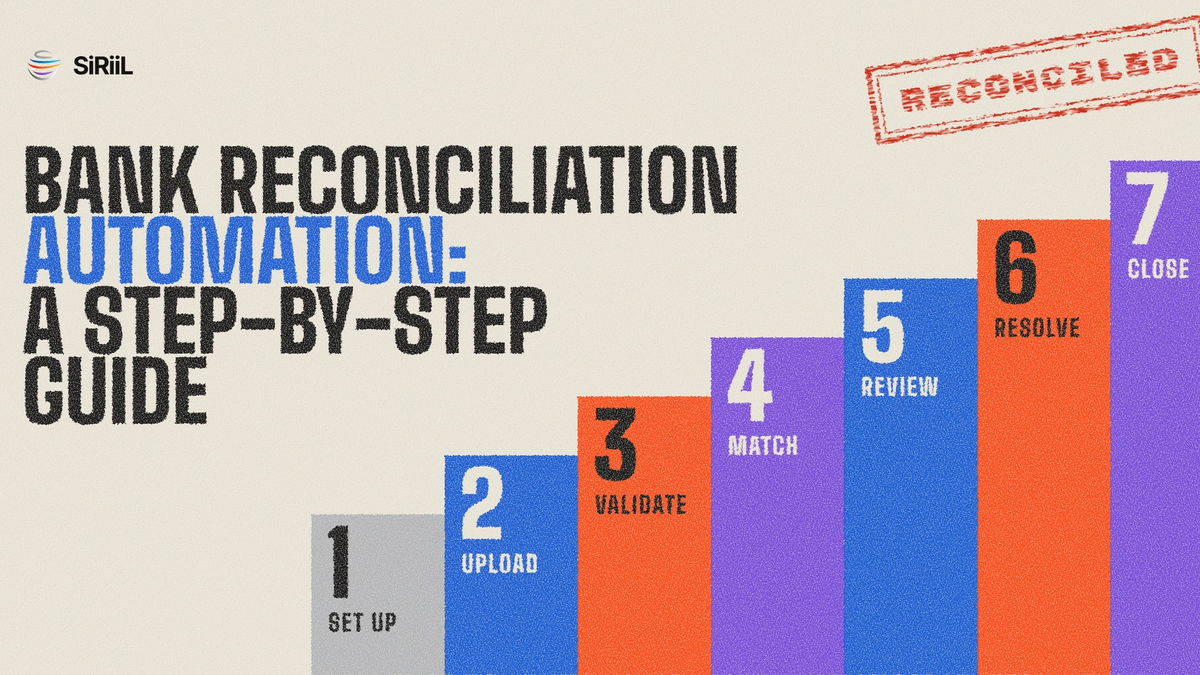
An automated bank reconciliation process follows seven stages:
Each stage prepares your financial data for the next step.
The software confirms the opening position, reads your uploaded files, and checks the data. It matches transactions and presents the remaining differences for your review.
Once all transactions have been reviewed, necessary adjustments have been recorded, and outstanding items have been classified, the system generates the final Bank Reconciliation Statement .
A Step-by-Step Guide to Bank Reconciliation Automation
Step 1: Set Up Your Bank Account and Initial Opening Position
Before starting your first reconciliation, you need to configure your bank account in SiRiiL. This is a one-time setup, so you do not need to enter your bank account details again for each reporting period.
Start by providing:
- Bank name and account number.
- Account name and reporting currency.
Once your bank account is configured, you need to establish its initial opening position by entering:
- Opening balance according to the accounting ledger.
- Opening balance according to the bank statement.
- Date of the opening balances.
These two balances may differ because some transactions have not yet cleared the bank or certain entries are missing from your accounting records.
For example, your books might contain three supplier cheques that the bank has not processed yet. You might also have customer deposits recorded by the bank that are not reflected in your ledger. These items can explain the difference between the two opening balances.
SiRiiL manages this through a one-time opening position setup. You enter both balances and upload a spreadsheet listing the items that make up the difference. The software then checks whether your breakdown accounts for the entire variance.
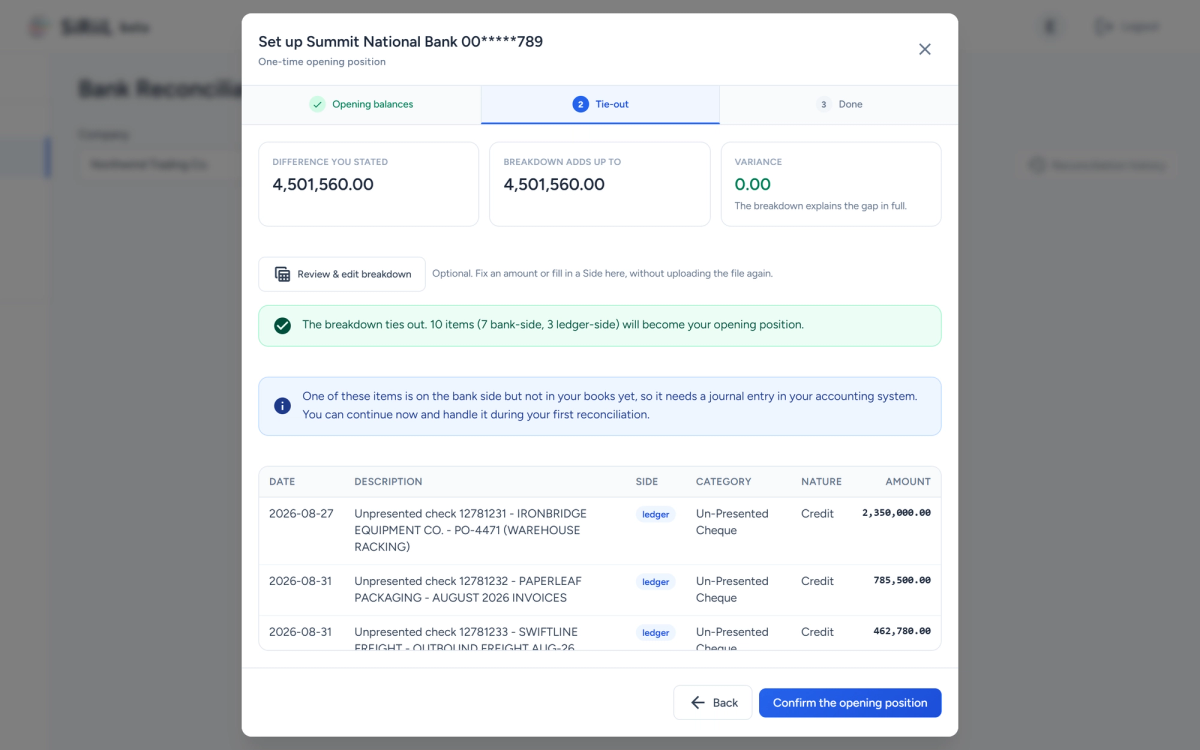
If the breakdown does not explain the whole difference, SiRiiL displays the remaining unexplained amount. It considers the opening position incomplete until you explain the entire variance.
Once you confirm the opening position, timing differences become open items. Entries missing from your accounting records move to the adjustment stage.
Step 2: Upload Your Bank Statement and Accounting Ledger
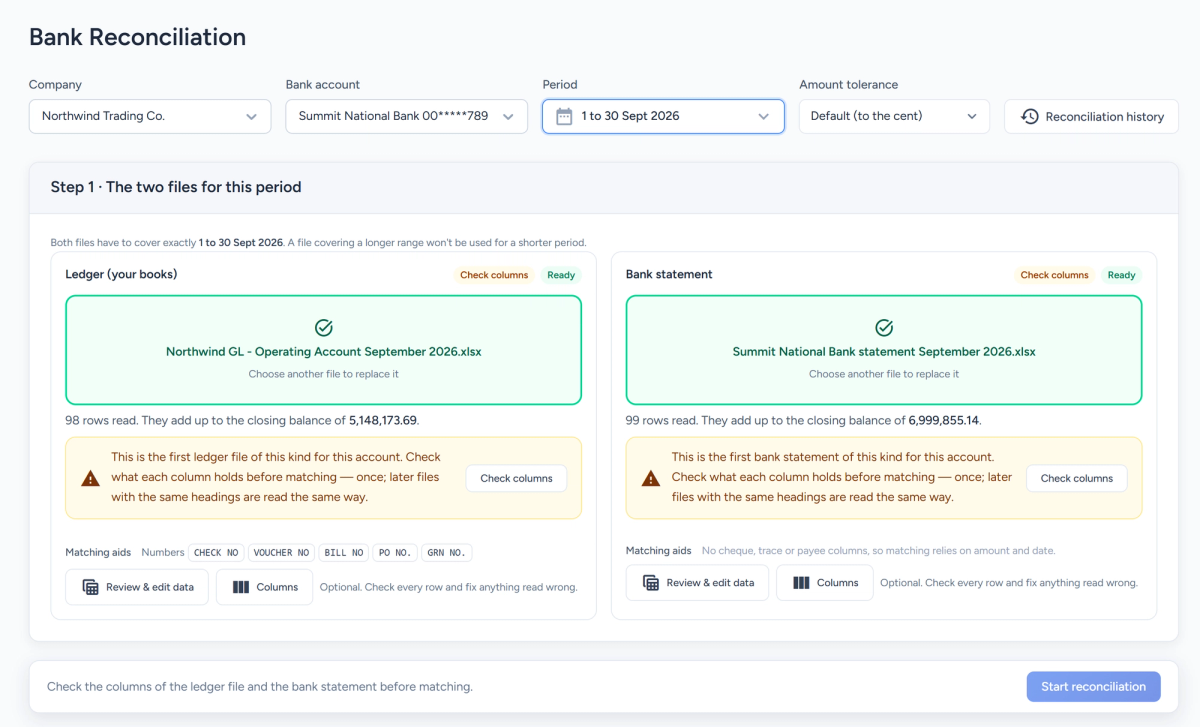
After configuring the account, select your reporting period and upload your two financial records.
The bank statement contains the deposits, withdrawals, transfers, and charges recorded by the bank. The accounting ledger contains your company corresponding entries. Both files need to cover the specific period you want to reconcile.
Upload formats depend on your software. Some systems integrate directly with accounting platforms, while others take exported files. SiRiiL currently takes Excel and PDF files. You select a daily, weekly, monthly, or custom reporting period and then upload your files.
Check the dates on both files before you proceed. A statement with transactions outside your selected period affects your opening and closing balance checks. The software should catch these date inconsistencies before matching begins.
Step 3: Validate the Extracted Financial Data
A bank statement usually uses different column names than an accounting ledger. One bank might call withdrawals "Debit," while another uses "Money Out." Cheque numbers, dates, and payment references also appear in different places depending on the bank.
The software has to identify these fields and organize them into a standard format. If it reads a date column as a reference number, the matching results will fail.
The validation process checks:
- Transaction dates and descriptions.
- Debit and credit amounts.
- Opening and closing balances.
- Cheque numbers and payment references.
- Total transaction counts.
- Whether the extracted transactions add up to the printed closing balance.
- Whether the period starts with the expected opening balance.
SiRiiL uses AI to identify the columns in your uploaded files. During your first upload, you review the detected columns and confirm them. The software then saves this layout for future uploads.
If your bank changes its statement format, SiRiiL detects the change and asks you to review the layout again. You can also fix extraction mistakes directly in the data sheet without uploading a new file.
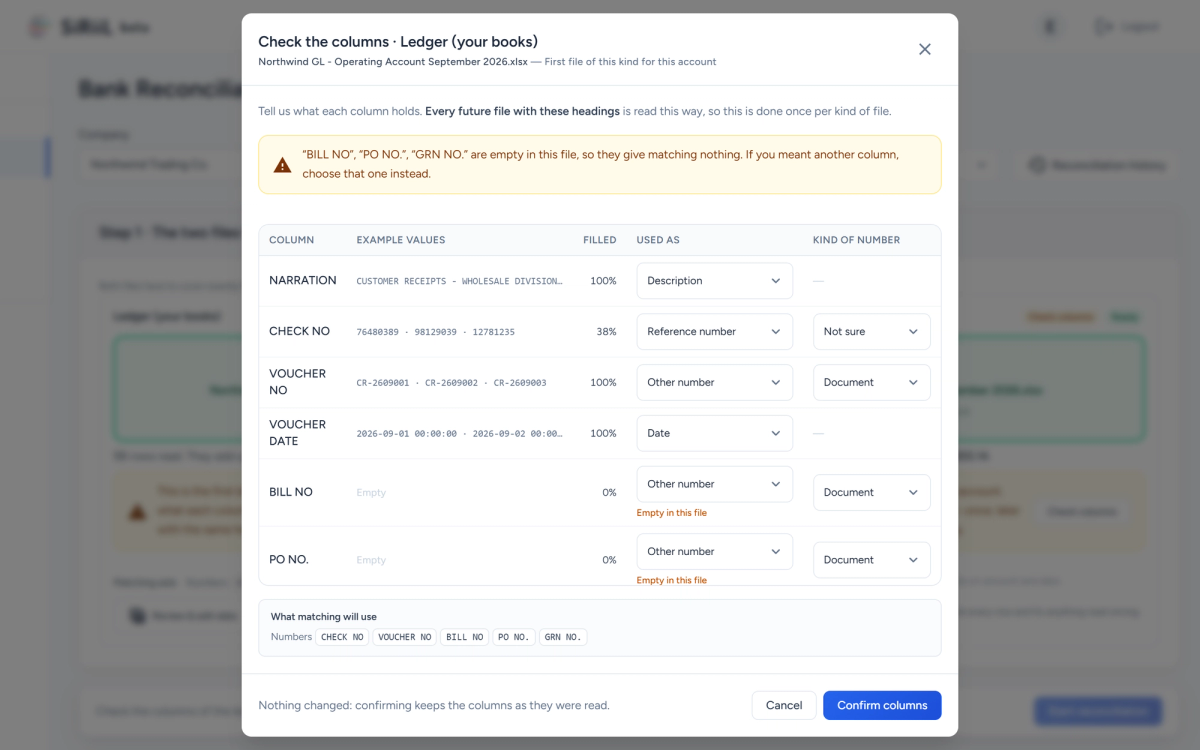
These checks catch reading errors and balance issues before the system tries to match transactions.
Step 4: Match Bank Transactions Against Ledger Entries
Matching requires more than just comparing identical numbers. A business might receive several payments of the exact same value. A single bank deposit might represent several different receipts in the ledger.
A matching engine looks at different types of evidence:
Reference matching: The system looks at cheque numbers, voucher numbers, and bank trace references to pair records. Exact reference matches are stronger evidence than similar descriptions.
Amount and date matching: The system compares transactions with the same amount, opposite directions, and close dates. If several records share the exact same amount, the system looks at other details to figure out the right pair.
Description matching: Customer names, supplier descriptions, and payment references help pair transactions when the exact wording differs.
SiRiiL uses transaction amounts, dates, references, and other available details to identify potential matches. It confirms a match only when it is approximately 99% confident that the transactions correspond. Transactions that do not meet this confidence level are presented as partial matches for further review. AI helps interpret unclear descriptions, while the system's matching rules handle the financial calculations.
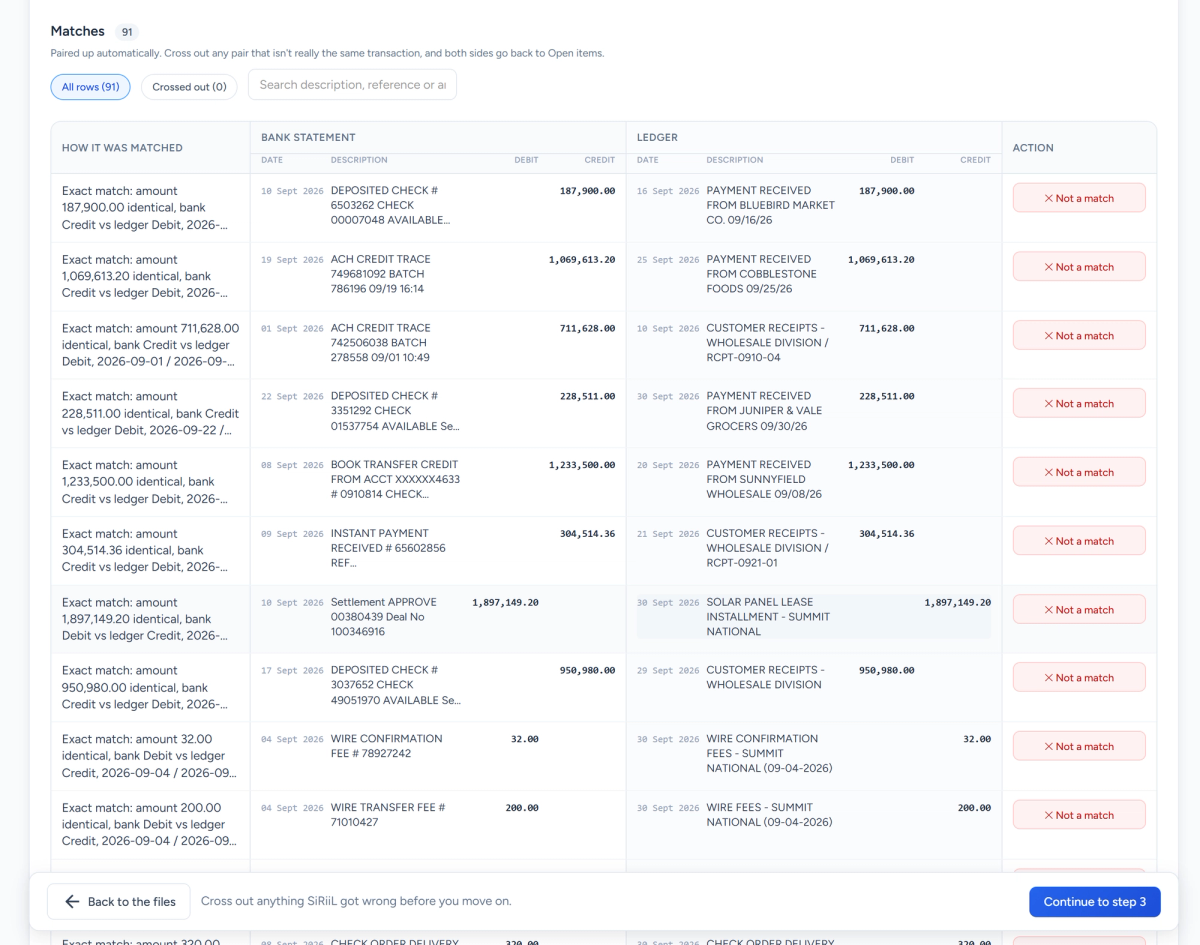
Step 5: Review Unmatched Transactions and Their Suggested Treatments
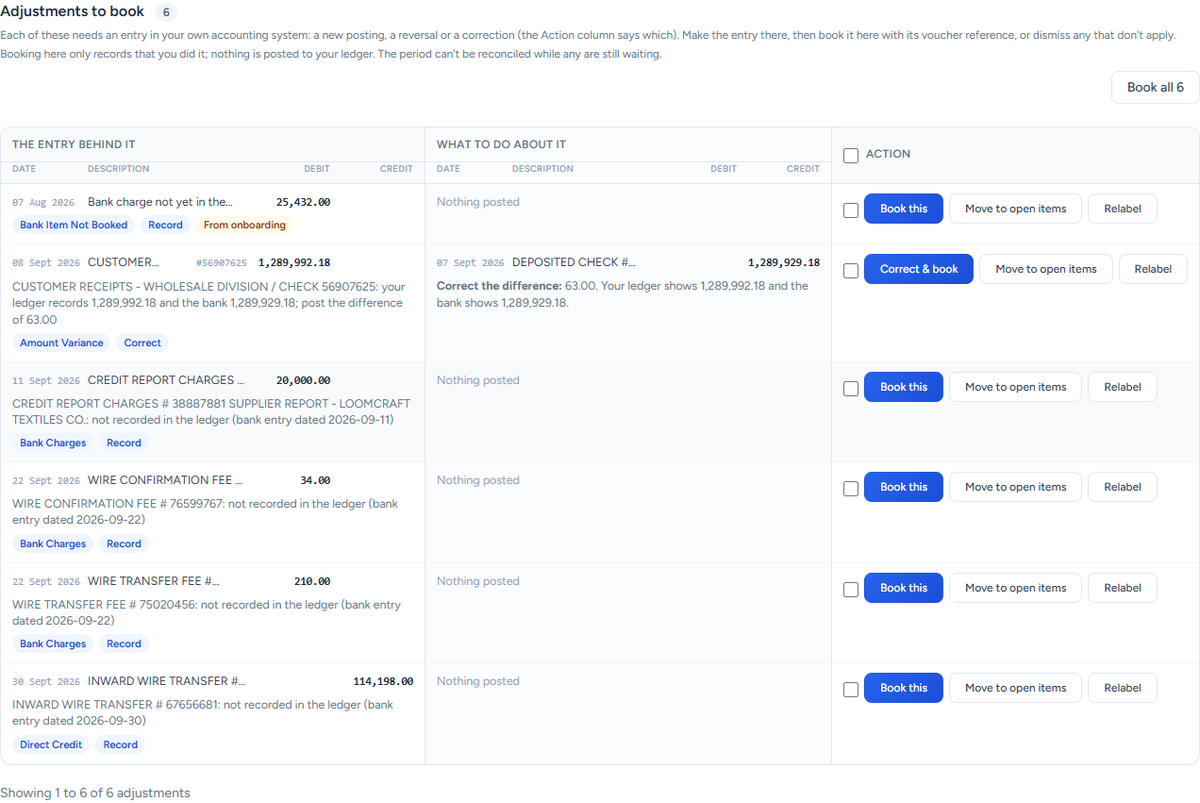
After SiRiiL completes the matching process, the remaining unmatched transactions are organized into three categories: Adjust your ledger, Partial Matches, and Open Items. Each category represents a different way of handling transactions that have not been confirmed as complete matches.
- Adjust your ledger: Transactions that require an accounting entry, such as bank charges or interest not yet recorded in your books.
- Partial Matches: Transactions where SiRiiL identifies a possible relationship between bank transactions and ledger entries but cannot confirm a complete match.
- Open Items: Outstanding transactions, such as unpresented cheques or deposits in transit, that need to be carried forward or reviewed.
You can review the transactions in each category and decide how they should be handled. Your decision determines the next step. An unrecorded bank charge requires an adjustment to your ledger, while an unpresented cheque remains an open item until it clears the bank.

Step 6: Resolve Differences and Record Adjustments
After reviewing the records, the accounting team decides how to handle the remaining items. SiRiiL groups these differences into three categories: Adjust the ledger, Carry forward, and Investigate.
Adjust the ledger Use this when the bank recorded a transaction that your books do not show yet, or when you need to fix a typing error in your ledger. Common examples are bank charges, interest, withholding tax, and direct debits.
If the bank deducts a $45 service charge missing from your ledger, the suggested journal entry is:
| Account | Debit ($) | Credit ($) |
|---|---|---|
| Bank Charges Expense | 45 | |
| Bank Account | 45 |
You record this entry in your accounting system. After you post it, you mark the adjustment as booked in SiRiiL and type in the journal reference number. SiRiiL suggests the entry, but it does not post it into your accounting system directly.
Carry forward Some differences do not need a journal adjustment. An unpresented cheque is already in your books but has not cleared the bank. A deposit in transit shows up in your books before the bank processes it.
These items stay open until the bank transaction happens. If you recorded a new receipt, you would just duplicate an entry you already made.
Investigate Use this when you cannot explain the difference right away. An unidentified deposit or a single ledger entry that covers several bank transactions might need supporting documents from another department.
SiRiiL provides separate views for ledger adjustments and open items. You can review suggested adjustments, record their journal references after posting them in your accounting system, and track outstanding transactions across reporting periods. Open items can also be matched manually once you identify the corresponding records.
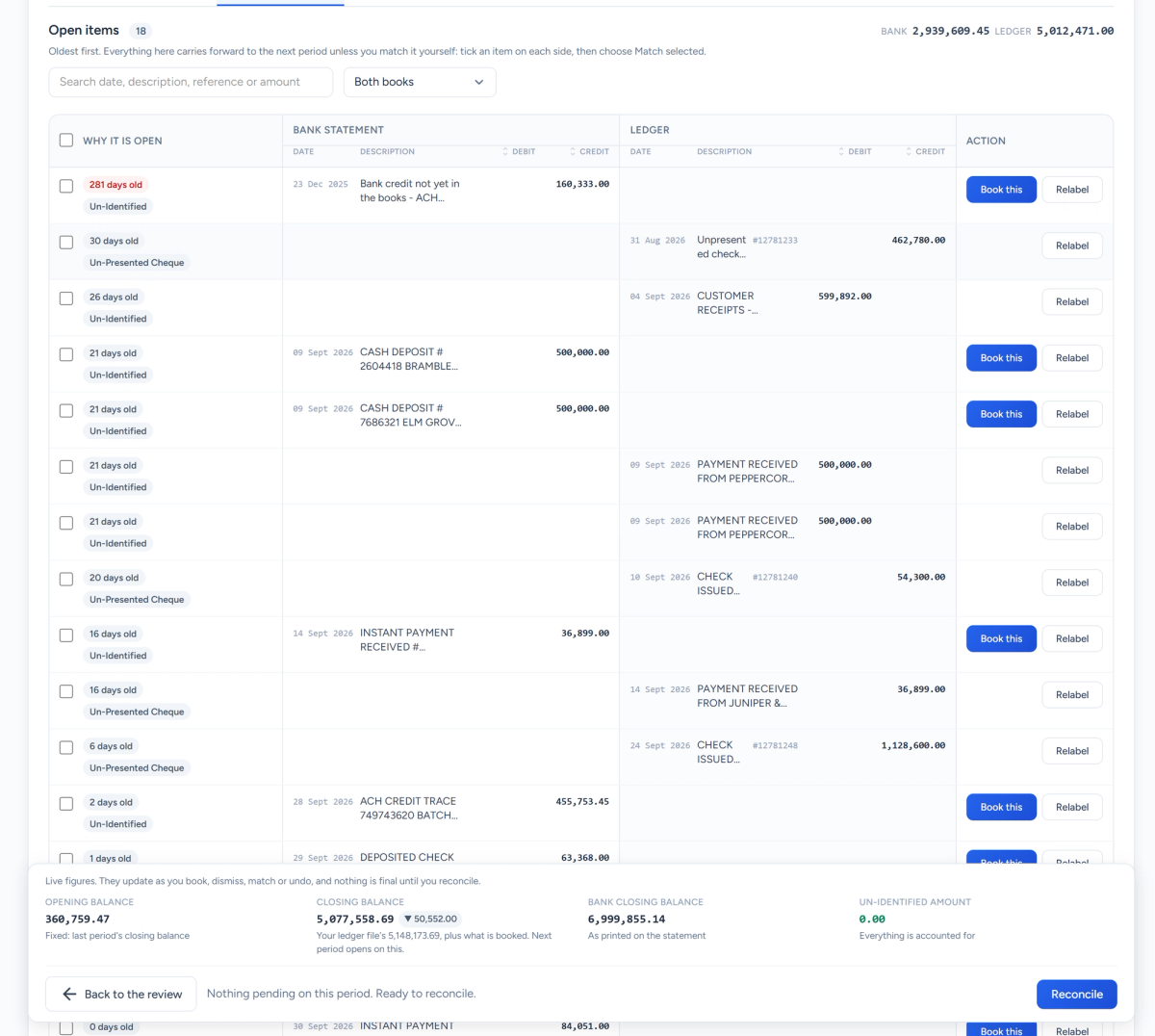
When an unpresented cheque clears in a later month, the software matches it against the open item you carried forward. You do not treat it as a new payment.
Step 7: Close the Period and Generate the Bank Reconciliation Statement
You can close the period once you review the matches, post the adjustments, and classify the outstanding items.
Before closing, the system checks for any adjustments still waiting for a decision. It calculates the remaining unidentified amount. If you have pending adjustments, SiRiiL prevents you from closing the period.
The final Bank Reconciliation Statement compares your adjusted ledger balance with your adjusted bank balance. Both numbers must match.
Here is a simplified example:
| Adjusted Ledger Balance | Amount ($) | Adjusted Bank Balance | Amount ($) |
|---|---|---|---|
| Ledger closing balance | 50,000 | Bank statement closing balance | 48,150 |
| Add: Interest not recorded | 200 | Add: Deposit in transit | 3,000 |
| Less: Bank charges | (50) | Less: Unpresented cheque | (1,000) |
| Adjusted book balance | 50,150 | Adjusted bank balance | 50,150 |
Both adjusted balances match at $50,150.
SiRiiL generates the statement with supporting schedules for the items you reconciled. The report shows both balances and any unexplained amounts. You can download it as a PDF or Excel file, complete with the preparer name and designation.
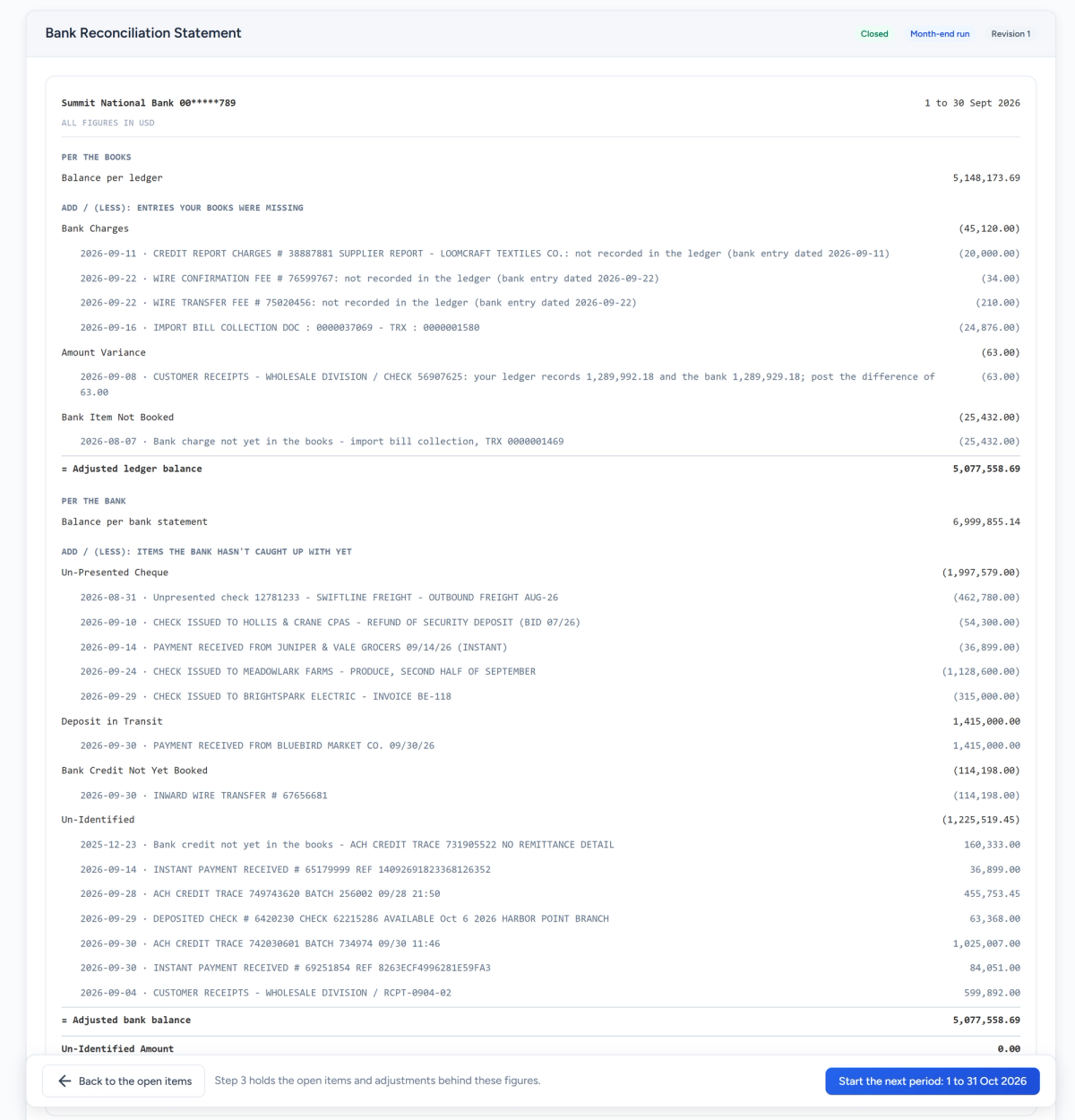
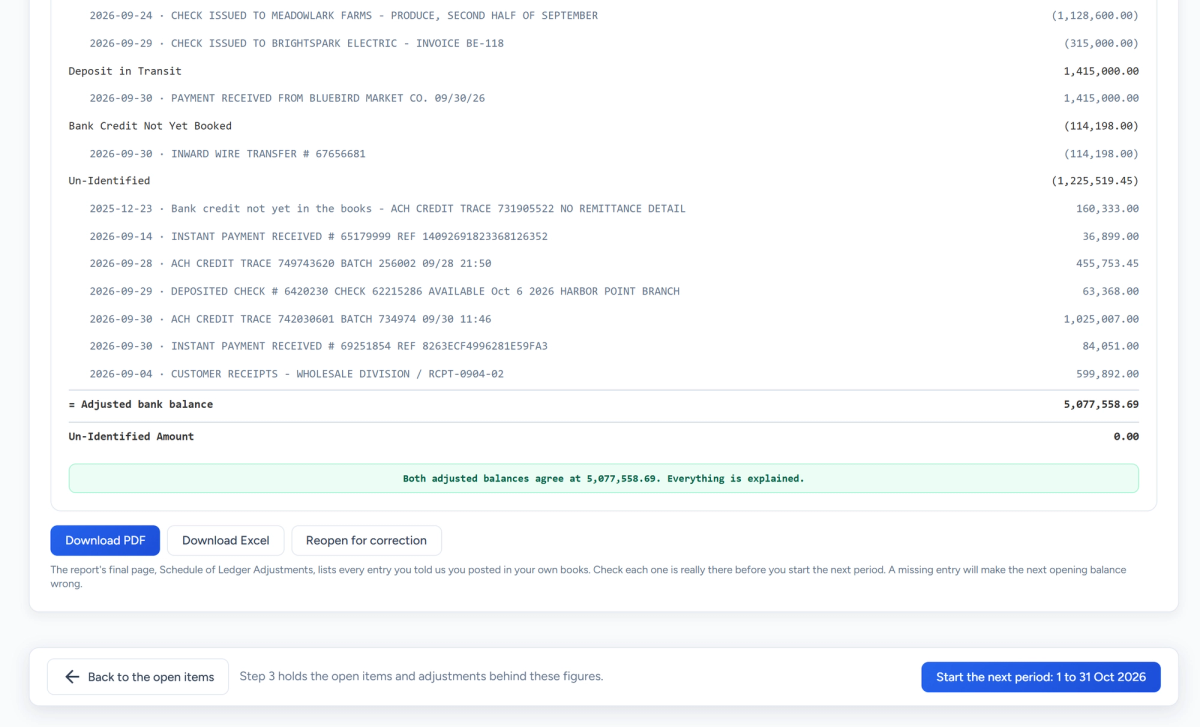
A closed period stays in your reconciliation history. If you need to fix a mistake in a completed period, you can reopen it by starting a new revision. The old version stays in the system as read-only history.
What Happens When You Start the Next Reconciliation Period?
Unresolved items from the previous month stay in your open-items ledger. They keep their original dates and descriptions until they clear the bank or you resolve them.
A cheque you issued in September but cleared in October matches against the open item you carried forward from September. You never enter it as a brand new transaction.
SiRiiL reuses your confirmed column layouts for each bank account. You upload your new bank statement and ledger without reviewing the columns again, as long as the bank file format has not changed.
The history tab keeps all your earlier periods, closing balances, and revisions. You can always go back to an old period to check what matched and what stayed open.
Frequently Asked Questions
- What is bank reconciliation automation?
It uses software to compare bank statements against accounting ledgers, pair up matching transactions, organize the differences, and generate reports. Accountants then review the software work and resolve the open items.
- Can automated bank reconciliation software read PDF statements?
Yes. Software with PDF reading tools can pull transaction dates, descriptions, amounts, balances, and references from statements. You always check this extracted data against the printed totals before matching starts.
- Can AI match transactions with different descriptions?
AI helps pair transactions when the text descriptions in your ledger differ from the bank statement. But uncertain matches always go to the accountant for review. The software relies on strict math and logic rules, not AI guesses, to combine transactions.
- What happens to unmatched bank transactions?
You categorize them based on what they are. Missing accounting entries get journal adjustments, timing differences stay open until they clear, and unexplained transactions go into a list for further investigation.
- Can automated reconciliation handle split payments?
Yes, if the software includes combination matching. A $6,000 bank deposit can match three separate $2,000 ledger receipts if the references and dates make sense.
- Does bank reconciliation automation eliminate manual accounting work?
It stops you from doing repetitive, line-by-line comparisons and organizes your exceptions. You still review uncertain matches, post the journal entries into your accounting system, and approve the final numbers.
Make Your Bank Reconciliation Process Easier to Manage
When accountants spend hours comparing spreadsheets to bank statements, unresolved transactions pile up and month-end closing becomes difficult.
Bank reconciliation automation gives finance teams a strict process to read records, match transactions, investigate the differences, and generate statements.
SiRiiL combines direct rule matching with AI reading, open-item tracking, suggested adjustments, and accountant reviews. The software handles the tedious comparison work, leaving the actual review and approval process to you.
If your team still uses manual spreadsheets, looking at one of your completed reconciliation periods can help you see exactly where automation would save you time.


